

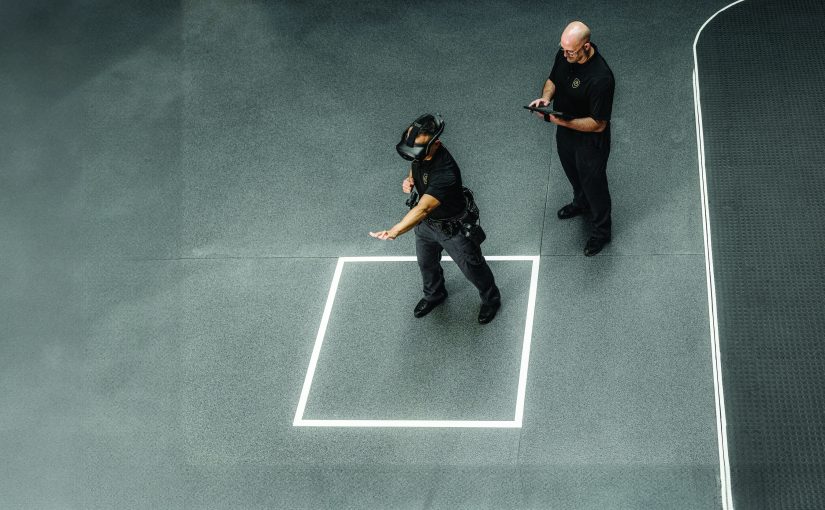
In today’s rapidly changing policing environment, training must evolve to meet complex demands: high-stakes encounters, mental health crises, community expectations for de-escalation, and limited resources for traditional role-play or live simulations. Virtual reality (VR) represents one of the most promising and innovative advancements in this landscape, offering immersive, repeatable, and safe practice that bridges the gap between classroom instruction and real-world application. However, agencies still need clear, field-tested guidance on implementing and sustaining such programs effectively.
Through a Bureau of Justice Assistance–funded initiative, the Rutherford County Sheriff’s Office, a midsize agency serving approximately 375,000 residents in suburban and rural Tennessee, implemented a fully immersive VR training program using the Apex Officer platform. The department focused initially on de-escalation skills, given their critical role in modern policing. Over three years, the agency learned valuable lessons from deployment, participant feedback, and conversations with other agencies adopting similar systems. This article distills those practical insights into a step-by-step roadmap for any law enforcement agency, large or small, considering VR to enhance training.
Preliminary results from the department’s deputies are encouraging. Officers reported significantly greater confidence in defusing situations, increased comfort handling challenging encounters, and heightened perceptions of training effectiveness. These improvements align directly with core leadership priorities: stronger de-escalation skills to reduce use-of-force incidents, more effective community interactions that build trust and improve relations, and more efficient training that lowers long-term costs in ammunition, travel, and personnel time. Deputies also highlighted VR’s realism and immersion, as well as the value of dynamic, branching scenarios and immediate playback during debriefs.
However, VR adoption comes with hurdles: high up-front costs (though long-term savings on ammunition, travel, and personnel may offset them), technical needs, logistical challenges, and the potential for motion sickness. These challenges are surmountable with careful planning, stakeholder buy-in, and lessons from the field.
From needs assessment and system selection to safety protocols, scenario customization, and post-training analysis, the following sections provide actionable strategies to build a sustainable program that evolves with the department’s needs.
Training Needs Assessment and Curriculum Development
The first step in integrating VR into an existing training program is to identify specific agency needs and gaps. Review performance evaluations, incident reports, and use-of-force data to identify the unique challenges to the agency. VR excels at addressing high-risk, high-frequency, or hard-to-simulate skills such as de-escalation, active shooter response, and use-of-force decision-making. The Rutherford County Sheriff’s Office case study focuses on de-escalation training, but the process applies broadly.
Once needs are defined, develop a targeted curriculum by setting clear, measurable learning objectives that officers can achieve upon completing training. Each objective should specify the desired behavior, the conditions under which it occurs, and how success will be demonstrated. Include a brief plan for how VR scenarios will build these skills (e.g., progressive difficulty, branching outcomes) and how instructors will assess mastery (e.g., debrief observations, playback review).
Design Effective Scenarios
Scenarios are the heart of VR training; they define what officers actually practice and directly influence skill transfer to the field. Customize scenarios to reflect the community’s realities: incorporate diverse cultures, languages, and demographics; include standard calls such as mental health crises, domestic violence, and interactions involving conditions like autism, schizophrenia, or dementia; vary settings (day/night, rural/urban, crowded/isolated); and, where possible, embed real local photos or locations for greater authenticity and relevance.
Customization varies by system. Fully immersive platforms offer the most flexibility for tailoring branching outcomes and environments. In contrast, non-immersive or semi-immersive systems often rely on pre-made content, making the selection of the correct system even more critical.
Understand VR’s limitations. Avatars may lack nuanced facial expressions and emotional depth, making subtle social cues harder to read. Physical interactions are restricted; users can’t always close a car door or perform every real-world action. These constraints mean VR should complement, not replace, live training and role-play.
Before sessions, pre-load all scenarios, confirm participant assignments, and verify equipment setup to avoid delays. Develop and refine scenarios well in advance, then update them regularly to mirror evolving community calls, department policies, legal standards, and certification requirements.
Every session should end with a structured debrief of the recorded scenario. These immediate, guided discussions let instructors and participants review performance, reflect on decisions, explain their reasoning, celebrate successes, and identify areas for improvement. Use downtime between scenarios for quick debriefs to keep momentum and maximize efficiency.
Selecting a VR System
Once the training needs, curriculum, and training objectives are defined, select a VR system that aligns with the agency’s goals, budget, and facilities. Systems vary primarily by level of immersion: non-immersive, semi-immersive, and fully immersive.
• Non-immersive systems use a computer, TV, or tablet interface, similar to a video game, providing the lowest immersion but the easiest entry point.
• Semi-immersive systems often use headsets and handheld controllers, allowing users to be immersed in the virtual space but stopping short of physical movement, offering a step up in realism from basic setups.
• Fully immersive systems fully envelop the officer in the virtual environment, typically using headsets, realistic replica weapons, and the ability to move around in the virtual space, making them the most lifelike option.
Table 1 compares the key strengths and weaknesses of each type to aid decision-making.
| Table 1: VR System Differences | ||
| VR System Type | Strengths | Weaknesses |
| Non-Immersive |
• Easily accessible • Affordable • Low risk of motion sickness • Minimal space required |
• Least realistic • No physical movement practice • Low scenario customization • Limited stress inoculation |
| Semi-Immersive |
• Greater realism • Easily observable on large screens • Lower cost than fully immersive |
• Limited ability to move in the space • Less realistic than fully immersive • Limited customization |
| Fully Immersive |
• Highest realism and engagement • Supports cognitive and physical tactics • Maximum scenario customization • Full video playback • Strong stress simulation and physiological responses • Advanced analytics and after-action review |
• Highest cost • Requires calibration and technical support • Greatest motion sickness risk • Needs a dedicated space • Higher setup/maintenance time • Requires a dedicated operator with significant training time |
Systems can also differ in equipment and equipment compatibility. Other things to consider in system selection include connectivity and availability of training analytics. Systems that can function without an internet connection and are portable may be favored when training occurs with limited internet speed. In contrast, systems with training analytics can track data such as aim and reaction time. Agencies should consider their unique needs and training objectives when selecting a system.
Budgeting and Funding for VR Training
VR training may deliver long-term cost savings compared to traditional in-person methods. Agencies can achieve a return on investment by reducing spending on ammunition, tasers, and other supplies. The stable, repeatable virtual environment eliminates the need to recreate situations off-site, further reducing personnel and logistical expenses.
Up-front costs vary significantly by immersion level. Non-immersive systems are the most affordable, often requiring only a console or basic hardware ($200–$600 range). Semi-immersive setups (especially if using large screens or headsets) generally fall in the $2,000–$5,000 range. Fully immersive systems with headsets, replica weapons, and supporting infrastructure are the most expensive and may range from $150,000 to $200,000 depending on scale and vendor.
If budget constraints are a concern, consider grants from federal, state, or local sources and explore partnerships with universities, private tech providers, or neighboring agencies. Develop a clear funding strategy that highlights projected savings, such as lower per-trainee costs over time and reduced reliance on live actors, along with pilot data or return-on-investment examples from similar programs. Presenting these numbers to leadership and grant reviewers strengthens the case and demonstrates fiscal responsibility.
Leadership and Stakeholder Engagement
Securing strong internal leadership and external stakeholder support is essential to position VR training as a funded, long-term priority rather than a short-term experiment. To persuade skeptical leaders and the city or county officials who control budgets, deliver a concise, evidence-based pitch early. Emphasize similar-program results (e.g., improved de-escalation, realistic feedback, reduced training time, improved learning), then tie to strategic goals (e.g., fewer use-of-force incidents, better community relations), and financial benefits (savings on ammunition, travel, actor costs). A focused executive brief showing operational and fiscal value can help convert doubters into supporters.
Externally, engage community partners, mental health providers, advocacy groups, and local leaders from the outset. Invite them to observe sessions and provide input on the relevance of scenarios and cultural accuracy. This collaboration builds trust, ensures training reflects community realities, and frames VR as a transparent, accountability-driven tool that serves public safety.
Proactive engagement internally and externally creates shared ownership, minimizes resistance from councils or unions, and strengthens budget requests and grant applications by demonstrating broad support. Investing time up-front makes VR a defensible agency priority, with the political and financial backing needed for success.
Preparing the Training Environment
A safe, well-prepared space is critical for effective VR training. Poor setup can lead to frustration, injury, or reduced immersion. Requirements vary by system type, so plan accordingly based on the chosen platform.
Non-Immersive Systems
These setups are straightforward, much like playing a video game. Provide a reliable network connection, a computer, and a screen to display the scenario, along with any required controllers or input devices. No significant movement is involved, so spatial needs are minimal.
Semi-Immersive Systems
Some of these systems involve some participant movement within a defined area, usually only a few feet. Clear an open, obstacle-free zone for safe navigation. If headsets are part of the system, assign a spotter to monitor the participant, prevent collisions with walls or furniture, and guide them back to boundaries if needed. Keep the area free of trip hazards.
Fully Immersive Systems
Fully immersive VR, which is of growing interest to many agencies, requires the most preparation due to unrestricted movement, sensory immersion, and technical complexity. Addressing these elements early will help ensure safe, efficient sessions with effective outcomes.
Physical Setup
Install and test tracking cameras or base stations (some requiring station mounts and wiring). Mark clear floor boundaries so that participants and spotters can easily identify safe zones. Designate separate areas for equipment storage and active training to keep the space organized and controlled. Use an interior room with adjustable lighting and cover windows to avoid sensor interference from direct sunlight. Build in extra time for setup and teardown (if changing locations), as they can be time intensive. Install a large monitor in the training room so observers (other trainees, instructors, or stakeholders) can watch scenarios in real time, promoting peer feedback, group learning, and debrief efficiency without crowding the play area.
Safety
Safety is nonnegotiable. Secure all live weapons before sessions to prevent any mix-up with replicas or training weapons. Remind participants that virtual objects cannot be physically interacted with; they may instinctively lean on nonexistent surfaces (like a car during a traffic stop), step off curbs, reach for items, or even lunge to go hands-on with an avatar, risking falls or impacts. Assign dedicated spotters to monitor participants and guide them away from walls, furniture, other people (in multi-user setups), and trip hazards. Spotters should be familiar with the system’s boundaries and the limited field of view through the headsets.
Equipment and System Management
Efficient technical handling keeps sessions running smoothly. Setting up the system can be challenging and often requires familiarity and skill with the system. Train staff on quick, safe donning (putting on) and doffing (removing) backpacks and headsets. Sanitize all gear between users to maintain hygiene standards.
Pre-session checks are essential: confirm scenario settings and manage batteries to avoid mid-training failures. Use hot swapping for continuous power, schedule battery changes between rotations and on breaks, and keep extension cords/power backups on hand. Establish preventative maintenance schedules, update software, train instructors on basic troubleshooting, and keep vendor contacts ready for advanced support or updates.
Well-maintained equipment minimizes downtime and extends system lifespan. A thorough pre-training checklist covering setup, safety rules, and equipment readiness helps prevent issues and keeps the focus on learning.
Participant Preparation
Proper orientation and role clarity set participants up for success, reduce anxiety, and maximize training effectiveness. Address these elements before any immersive scenario begins. When class participants are not engaging in the scenario, ask them to rate those in it on specific performance factors and to provide feedback. These activities will keep them engaged and enhance learning.
Orientation
Start every session with a low-pressure tutorial scenario. This introductory experience allows users get comfortable with the headset, controls, basic movements, and weapon handling without the stress of a real call. Trainers should walk participants through equipment use, explain all controls, outline safety rules, and reinforce expectations (e.g., no physical interaction with virtual objects, reliance on spotters). This brief two- to five-minute familiarization builds confidence and prevents early frustration or motion sickness.
Training Roles and Structure
Clear role definitions create structure and realism. Make sure all participants understand who does what, especially in fully immersive setups, which may require more people than anticipated. Table 2 outlines key roles. A strong driver, voice actor, and trainer are essential for quality. Combining driver and voice actor roles under the trainer can save on staff but requires a highly skilled operator to maintain dynamism and realism. Roles can overlap in smaller setups, but separating them, especially for immersive systems, may yield better results.
| Table 2: Roles in VR Training | |
| Role | Duties |
| Driver | Controls scenario progression, avatar actions, and system operations |
| Voice Actor | Delivers live, realistic dialogue for subjects and bystanders |
| Spotter | Monitors participant safety, prevents collisions, swaps equipment as needed—ideally someone who has completed training and understands boundary limits and headset field-of-view restrictions |
| Trainer | Leads the session, facilitates instruction, and conducts debriefs |
| Additional Participant | Voiced or fully immersed separate person(s) play secondary characters, mental health co-responders, or fellow officers (optional; boosts realism and supports multi-user scenarios) |
| Participant (Trainee) | Actively engages in the scenario |
Participant Concerns
VR can trigger physiological and psychological responses, even though participants know it’s simulated. Officers may experience fight-or-flight reactions (elevated heart rate, blood pressure), anxiety, or trauma echoes from past incidents. Motion sickness can occur, and headsets can feel heavy or uncomfortable during longer scenarios.
Address these possible challenges up-front: discuss potential reactions during orientation, provide self-monitoring tips, ensure access to support, and build in after-action reviews and debriefs. Remind participants to speak up about discomfort so adjustments can be made immediately. Proactive communication normalizes these responses and keeps training productive and safe.
Addressing Legal, Ethical, and Liability Issues
VR training raises unique legal and ethical issues distinct from live-fire or physical drills, particularly regarding recorded scenarios and performance data. One concern for some agencies and unions is recorded footage and metrics (e.g., replays, reaction times, decisions), which can feel like permanent performance records and spark fears of discipline, grievances, or public disclosure. To mitigate this, limit data and recorded scenario access to authorized trainers for debriefing only, set short retention periods, prohibit use in punitive evaluations without explicit agreement, and engage union representatives early to co-develop policies and build trust. Consult department legal counsel to review data protocols and incident reporting procedures. Ensure secure storage and compliance with privacy laws. Communicate these safeguards openly to officers and unions so VR is viewed as a professional development tool, not a surveillance mechanism.
Post-Training Analysis
Effective debriefing and analysis turn VR sessions into powerful learning opportunities, especially with the ability to review recorded performance immediately after each scenario.
Video Playback and Visual Feedback
Recorded footage allows participants to see themselves in action—reviewing movement, body language, positioning, weapons use, and decision-making from angles not normally visible in real time. Instructors can pause, rewind, highlight key moments, and guide reflective discussion. This interactive replay helps officers understand what went well, what could be improved, and which choices led to specific outcomes.
Performance Metrics and Data Insights
VR platforms may capture objective data such as reaction time, weapon draw speed, shot trajectory, gaze direction, decision points, and scenario branching paths. Instructors can use these metrics to pinpoint strengths and gaps with precision far beyond what live role-play offers. For example, a delayed reaction or poor tactical positioning becomes clearly visible in data, not just in subjective opinion.
Apply these insights to create personalized follow-up training: targeted scenarios for recurring weaknesses, progressively more difficult scenarios for experienced officers, or group discussions on common trends. Regular analysis reinforces learning, tracks progress over time, and demonstrates value to leadership (e.g., measurable improvements in confidence or decision speed). Make post-scenario review part of every session. Keep it structured, positive, and focused on growth. This step is where VR’s full value emerges: safe, repeatable practice paired with immediate, evidence-based feedback.
Conclusion
As policing continues to evolve, VR offers agencies a powerful way to train smarter, safer, and more cost-effectively, preparing officers for the complex, high-stakes encounters they face every day without the risks, costs, or limitations of traditional methods. While up-front hurdles such as costs, setup, and buy-in remain real, the long-term gains in officer safety, community trust, and budget efficiency demonstrated by agencies like the Rutherford County Sheriff’s Office make VR a worthwhile investment. Chiefs and training commanders who start small, assessing needs, piloting a system, and engaging stakeholders, will find the future of effective training is immersive, repeatable, and within reach. d

Please cite as
Ben Stickle et al., “A Roadmap for Police VR Training,” Police Chief Online, July 22, 2026.